Sometimes, while making music or listening to a conference presentation, we had to set up multiple transmitters so different devices could listen to the same audio feed. For example, in a recording studio with several people, each of us needed to hear the singer or instrumentalist, but Bluetooth did not allow this because it only created a one-to-one link between a single transmitter and a single receiver, making it impossible for multiple devices to connect and stream audio at once.
We needed a technology similar to Wi-Fi where everyone could simply tune into a single access point and listen. This would be incredibly useful in conference talks, in museums where a tour guide gives explanations that need to reach every visitor's headset, or in train stations where loud speaker announcements often get lost in crowd noise and train rumblings.
This is where a new technology called Auracast was introduced to solve these exact problems.
What is Auracast? How did it come about?

In terms of network architecture, Classic Bluetooth has always operated on a dedicated, point-to-point connection model. This meant the transmitter and receiver first had to pair with each other, establishing a two-way, encrypted communication channel exclusively between those two specific devices.
The problem was that this structure fundamentally prevented a single source, such as an audio system, from transmitting high-quality sound to multiple devices simultaneously without dramatically increasing power consumption and bandwidth usage. This limitation was one of the main reasons why sharing public audio was so difficult with Classic Bluetooth.
To solve this constraint, the Bluetooth Special Interest Group (Bluetooth SIG) introduced a new protocol called Auracast within the Bluetooth LE Audio standard. This shifted the communication paradigm from a two-way dialogue to a unidirectional broadcast. In this model, the transmitter broadcasts audio data encoded with the power-efficient LC3 codec as open wireless packets into the surrounding area. Receivers do not need to pair or send acknowledgement back to the source; like a basic radio antenna, they instantly capture and decode the audio stream, allowing an unlimited number of listeners to tune in at once.
The Technology and How It Works
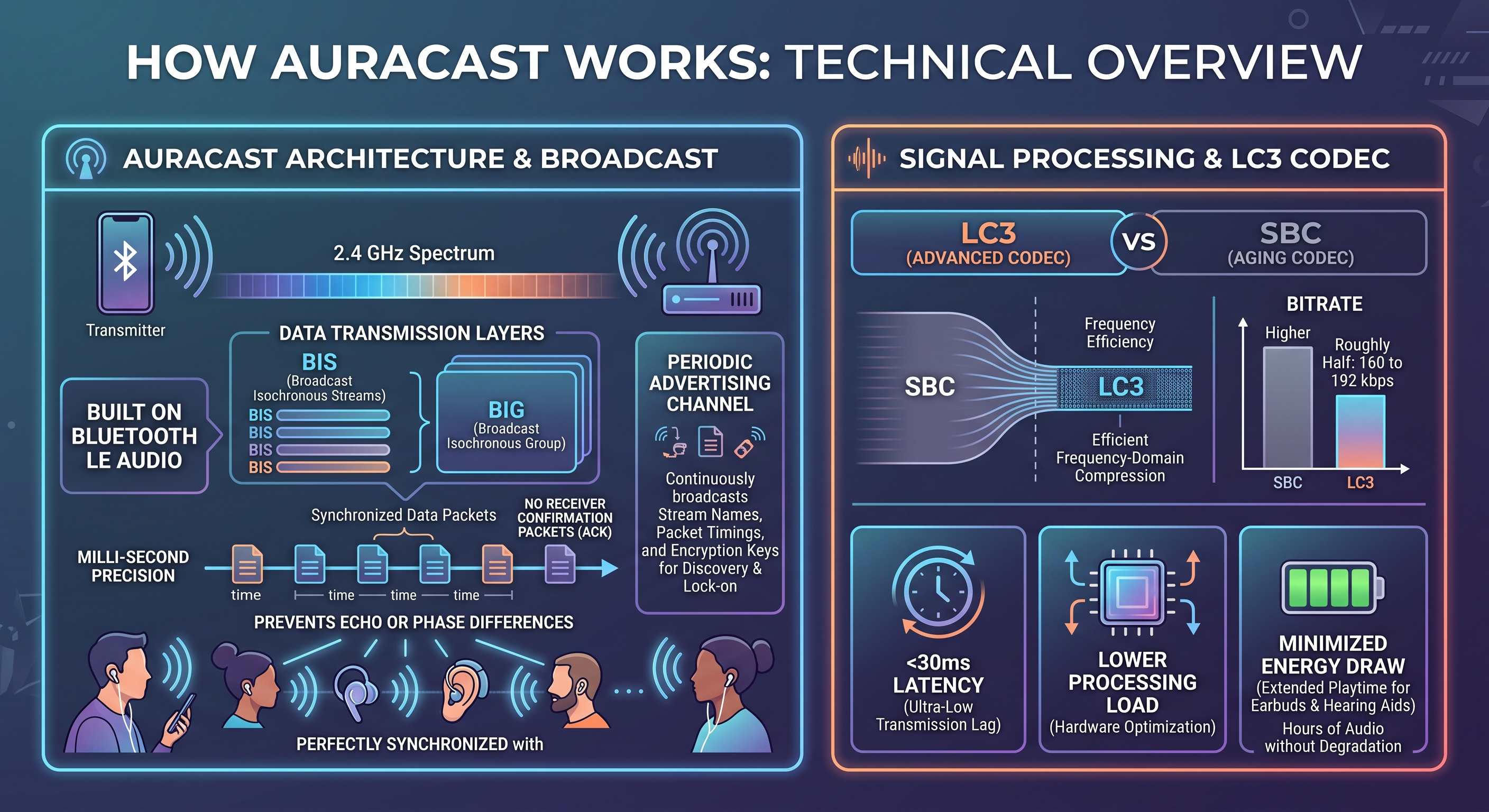
From a technical standpoint, Auracast is built on the Bluetooth LE Audio architecture using two core data transmission layers: Broadcast Isochronous Streams (BIS) and Broadcast Isochronous Groups (BIG). This framework allows the transmitter to broadcast audio packets across the 2.4 GHz spectrum at strictly synchronized intervals with millisecond-level precision, without waiting for receiver confirmation packets (ACK). This precise timing prevents echo or phase differences when many people are listening at the same time. Alongside data transmission, a Periodic Advertising channel continuously broadcasts metadata, stream names, precise packet timings, and encryption keys (for private broadcasts), allowing nearby devices to locate and lock onto the signal.
In signal processing, the core engine behind this technology is the advanced LC3 (Low Complexity Communication Codec), which replaces the aging SBC codec. Using far more efficient frequency-domain compression, the LC3 algorithm delivers noticeably higher clarity and detail at bitrates roughly half those of SBC (around 160 to 192 kbps). This optimization lowers processing loads on hardware chips, cuts transmission latency below 30 milliseconds, and minimizes energy draw, enabling tiny batteries in earbuds and hearing aids to decode audio streams for hours without audio degradation.
What Was the Purpose Behind This Technology, and Where Does It Help?

The primary motivation was breaking through Bluetooth's fundamental barrier in simultaneous audio sharing. Classic Bluetooth was fundamentally designed for point-to-point connections. If several people wanted to watch a movie, listen to music, or play a game together using their own headphones, viable options were scarce. Users either had to rely on unstable proprietary workarounds from specific brands, which were usually capped at two receivers with noticeable latency and heavy battery drain, or fall back on physical audio splitters. Auracast arrived to make audio sharing among friends and family simple, standard, and brand-agnostic, with no signal degradation and virtually no limit on the number of connected listeners.
The second, and perhaps most impactful, need was transforming assistive listening systems for individuals with hearing loss and phasing out legacy infrastructure. For decades, public venues such as lecture halls, theaters, airports, and train stations relied on aging analog technologies like induction telecoils (hearing loops) or FM transmitters. These systems often require costly, complex wiring and frequently suffer from background hiss, interference, and audio degradation. Auracast was developed to deliver an integrated, low-cost digital foundation for these spaces, allowing hearing aids, cochlear implants, and standard everyday earbuds to receive clean, amplified audio directly from a presenter or a boarding gate announcement without background noise interference.
The third need addressed noise pollution control and multilingual services in public venues. Imagine a gym with dozens of TVs where playing audio out loud is not an option, a museum where every visitor needs a tour guide narration, or an international conference offering simultaneous translations across multiple languages. Using dedicated radio hardware or blaring overhead speakers is expensive and creates acoustic chaos. Auracast enables every display or stage to broadcast multiple independent audio streams wirelessly, such as different TV channels or real-time language translations. Visitors simply scan a QR code or tap the channel name on their phone to listen directly through their own headphones.
Key Advantages of Auracast Over Classic Bluetooth:
Unlimited Simultaneous Receivers (Scalability): Traditional Bluetooth was limited to point-to-point connections, and even proprietary Dual Audio solutions capped connections at just 2 devices. Auracast removes any numerical ceiling, allowing a single transmitter to broadcast audio to thousands of headphones or hearing aids simultaneously without signal degradation.
Eliminating Pairing Friction (No Pairing Required): There is no longer a need to enter pairing mode, wait through device searches, or confirm two-way handshakes. Joining an audio broadcast is as fast and frictionless as connecting to public Wi-Fi or scanning a simple QR code.
Higher Audio Quality with Lower Battery Consumption (LC3 Codec): By replacing the legacy SBC codec with the highly efficient LC3 algorithm, audio is transmitted at lower bitrates while delivering noticeably clearer sound and better instrument separation. This dramatically reduces power draw for earbuds and hearing aids.
Ultra-Low Latency: Classic Bluetooth typically introduces 100 to 200 milliseconds of delay, creating noticeable lip-sync issues during video playback and gaming. Auracast uses isochronous timing synchronization to cut latency down to under 20 to 30 milliseconds.
Multi-Stream Audio from a Single Source: A single Auracast transmitter can broadcast multiple independent audio channels in parallel. For instance, an airport TV can stream separate English, French, and Spanish tracks, or discrete left and right stereo channels, allowing listeners to pick their preferred language feed.
Unified Standard for Consumer Headphones and Hearing Aids (Assistive Listening): With Classic Bluetooth, hearing loss gear required expensive, fragmented, and proprietary protocols. Auracast integrates hearing aids and cochlear implants into the exact same standard used by everyday consumer headphones, eliminating bulky adapters or costly loop wiring.
Comparison Table between Bluetooth and AuraCast and its advantages:
| Feature / Metric | Classic Bluetooth | Bluetooth Auracast |
|---|---|---|
| Communication Model | Point-to-Point and exclusive | One-way Broadcast |
| Simultaneous Receivers | Maximum 1 device (up to 2 in rare dual-audio modes) | Unlimited (hundreds or thousands simultaneously) |
| Pairing Process | Mandatory, slow, and requires two-way handshake | No pairing required (instant access via search or QR scan) |
| Default Audio Codec | SBC (legacy compression, higher power draw) | LC3 (higher audio quality at half the bitrate and power) |
| Latency | Typically 100 to 200 ms | Under 20 to 30 ms (synchronized isochronous streams) |
| Multi-Channel Support | Single audio stream per output | Parallel multi-language or multi-channel audio from one source |
| Hearing Aid Compatibility | Requires proprietary protocols or analog intermediary devices | Direct native compatibility with next-gen hearing aids and implants |
What Are the Prerequisites for Using It?
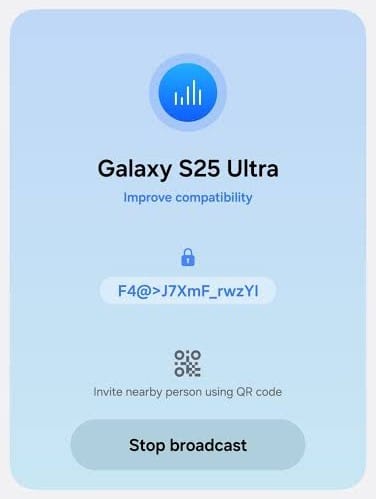
To use Auracast, a complete chain of hardware and software prerequisites must be in place. This is not a standalone software feature that can simply be added to older devices via an app; rather, it depends directly on the Bluetooth chipset architecture.
1. Technical Prerequisites for Use: To establish an Auracast connection, all three of the following components must support the Bluetooth LE Audio standard:
Radio Hardware: Bluetooth version 5.2 or higher with physical hardware support for Isochronous Channels.
Compression Codec: Native support for the standard LC3 codec.
Operating System / Firmware: System software that has enabled the Auracast protocol layers (Broadcast Source, Broadcast Sink, and Broadcast Assistant roles).
Which Devices Support Auracast?
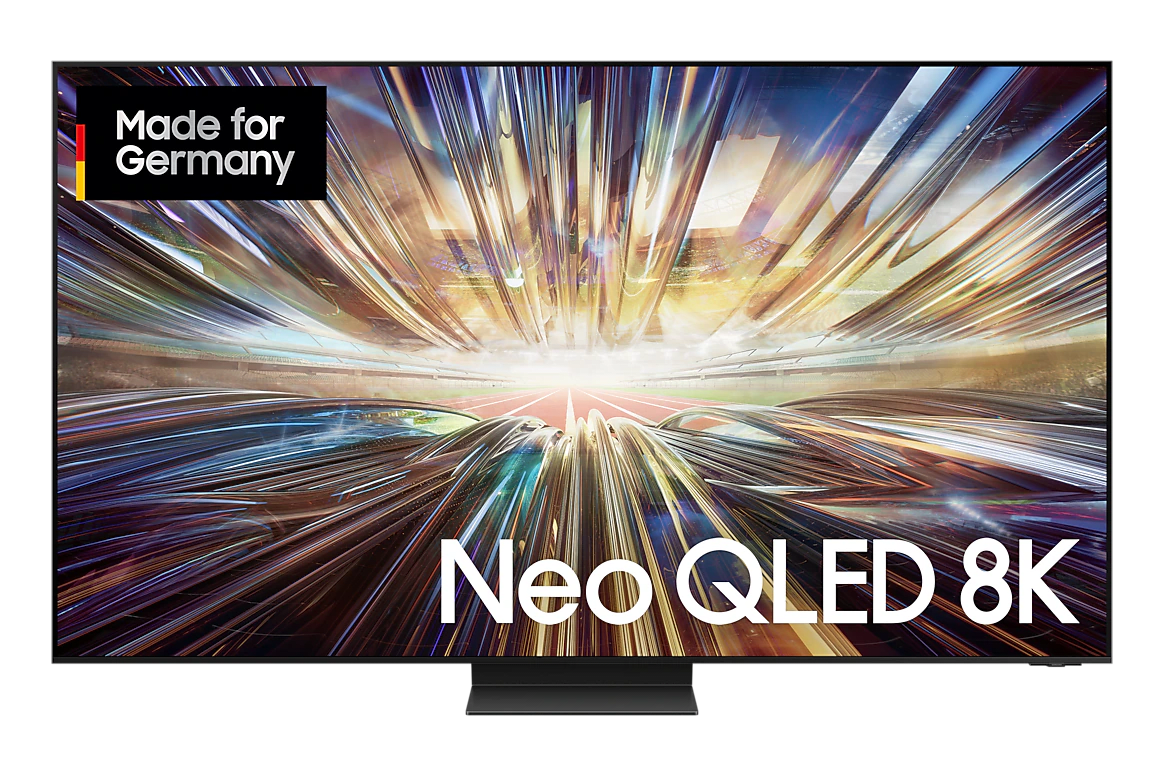
Next-generation devices from major brands have added this feature in both transmitter (Source) and receiver (Sink) roles:
Smartphones and Tablets:
Modern Samsung flagships and mid-rangers (Galaxy S23 series and newer, Z Fold/Flip 5 series and newer, Galaxy Tab S9 series and newer running One UI 5.1.1 or above).
Phones powered by modern Qualcomm chips (Snapdragon Sound / Snapdragon 8 Gen 2 and newer) and next-gen MediaTek chipsets.
Google Pixel phones running Android 13 and newer.
Headphones and Earbuds:
Modern Samsung models (such as Galaxy Buds2 Pro and Buds3 / Buds3 Pro).
Compatible Sony earbuds and headphones (such as LinkBuds S, WF-1000XM5, and WH-1000XM5 via LE Audio firmware updates).
Newer products from Sennheiser (Sennheiser Momentum True Wireless 4), Jabra, JBL (JBL Tour Pro 2, Live 3 series), and EarFun.
Smart TVs and Home Audio Systems:
Modern Samsung and LG smart TVs, as well as dedicated TV Bluetooth transmitter dongles.
Hearing Aids and Medical Devices:
Next-generation smart hearing aids and implants from brands like ReSound, Oticon, and Cochlear.
Can It Run on Older or Standard Smartphones?
Older Phones (Bluetooth 5.1 and earlier): No. Due to hardware architecture and radio chipset limits, these phones cannot generate synchronized Isochronous packets and cannot gain native Auracast transmission or reception capabilities through software updates.
Phones with Newer Chipsets (Bluetooth 5.2+) on Older Operating Systems: If the phone has compatible modern hardware, the feature can be activated once the OS is updated (to Android 13, 14, or newer) and supported by manufacturer firmware.
Workarounds for Incompatible Equipment: For older TVs, audio systems, or laptops lacking Auracast support, you can connect external Auracast USB/Aux transmitter dongles to broadcast audio over Auracast.
Does It Require a Dedicated App to Set Up?
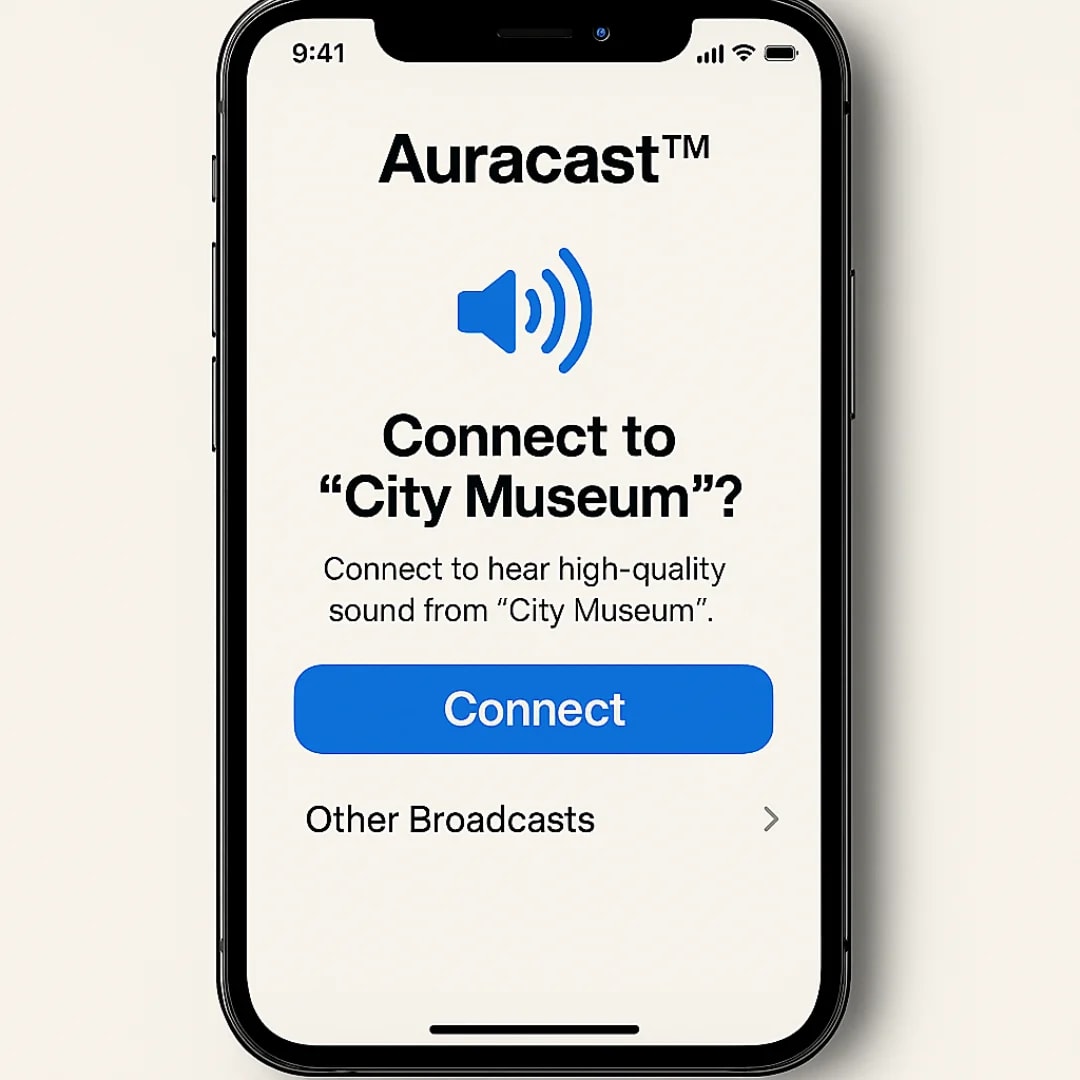
Modern Smartphones Acting as a Transmitter or Assistant: No dedicated app is needed. The feature is built natively into Android's Bluetooth settings.
On Samsung devices, you can share audio directly using "Broadcast sound using Auracast" in the Bluetooth menu.
Using your phone's default camera app, you can scan venue QR codes to tune directly into a local broadcast.
Third-Party Devices and Select Headphone Brands: Some manufacturers include an "Auracast Assistant" inside their proprietary headphone apps (such as Sony Headphones Connect or JBL Headphones) to help search nearby broadcasts and enter access passwords.
Step-by-Step Guide to Using Auracast:
To make this easy to follow, let's walk through a practical scenario. Imagine you want to play a song from your smartphone and have both your speaker and your headphones receive and play that exact song simultaneously from your phone. To achieve this scenario, there are two main approaches: using the modern Auracast technology (if all your devices support it) or using a native audio-sharing feature like Samsung's Dual Audio (which works with standard, everyday Bluetooth headphones and speakers on the market). Follow the step-by-step instructions for both methods below.
Method 1: Broadcasting with Auracast Technology
Prerequisites: The host smartphone must feature Bluetooth 5.2 or higher running Android 13 or newer, and both your headphones and speaker must natively support Auracast audio reception.
Step 1: Turn On Bluetooth and Initial Setup
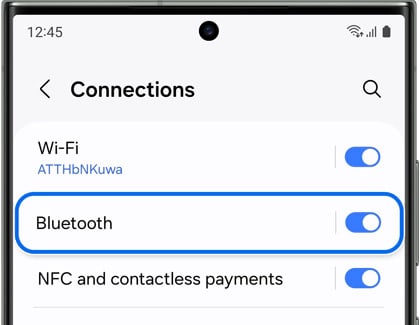
Step 2: Start Audio Playback
Play your desired track or podcast through your preferred music player, Spotify, or YouTube.
Step 3: Enable Broadcast Audio on Your Smartphone
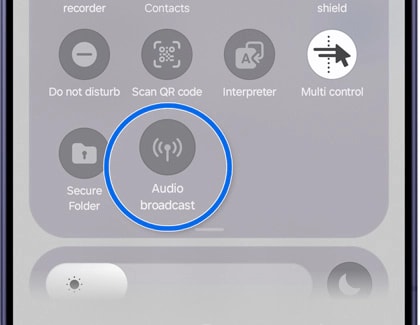
Open Settings on your phone and navigate to Connections > Bluetooth. Tap the three-dot menu icon in the upper corner and select "Broadcast sound using Auracast" or "Broadcast Audio." Set a broadcast name (such as "My Music"). If you want open access without a password, leave the security setting on "Open" and tap "Start Broadcast." Your smartphone now operates as a local audio transmitter broadcasting sound into the surrounding area.
Step 4: Connect Your Headphones to the Broadcast Stream
If your headphones feature a dedicated Auracast physical button, press it to lock onto your phone's broadcast signal. If there is no physical button, open the headphones' companion app on your phone, navigate to the Auracast or Broadcast Assistant section, locate your broadcast name, and tap "Join."
Step 5: Connect Your Speaker to the Broadcast Stream
Repeat the exact same step for your speaker. Press the Auracast button on the speaker or select your broadcast stream via the speaker's companion app and connect. Both devices will now play the phone's audio simultaneously with zero synchronization delay.
Method 2: Dual Audio Simultaneous Connection (For Samsung Phones and Standard Bluetooth Devices)
If your speaker or headphones are older models without Auracast support, you can use the built-in dual audio feature.
Step 1: Pair Both Devices to the Phone
Open your phone's Bluetooth settings. Place your headphones into pairing mode and connect them. Place your speaker into pairing mode and connect it as well, ensuring both appear under Connected Devices.
Step 2: Play Audio
Start playing music on your smartphone. By default, audio will play through only one of the two connected devices.
Step 3: Route Audio to Both Devices Simultaneously
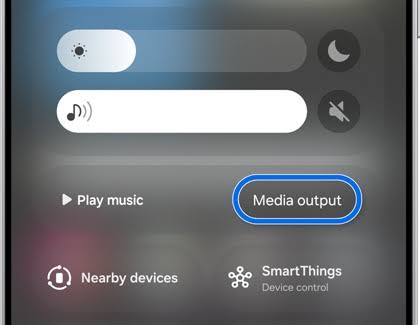
Swipe down from the top of the screen to open the Quick Settings / Notification panel. Tap "Media Output." In the menu that appears, you will see all active audio devices. Check the boxes next to both your headphones and your speaker.
Step 4: Adjust Individual Volume Levels
Inside the Media Output menu, independent volume sliders will appear for each device. You can adjust the headphone and speaker volumes separately or use the master slider to raise and lower both together for balanced playback.
How to Set Up a Large-Scale Public Announcement System Using Auracast
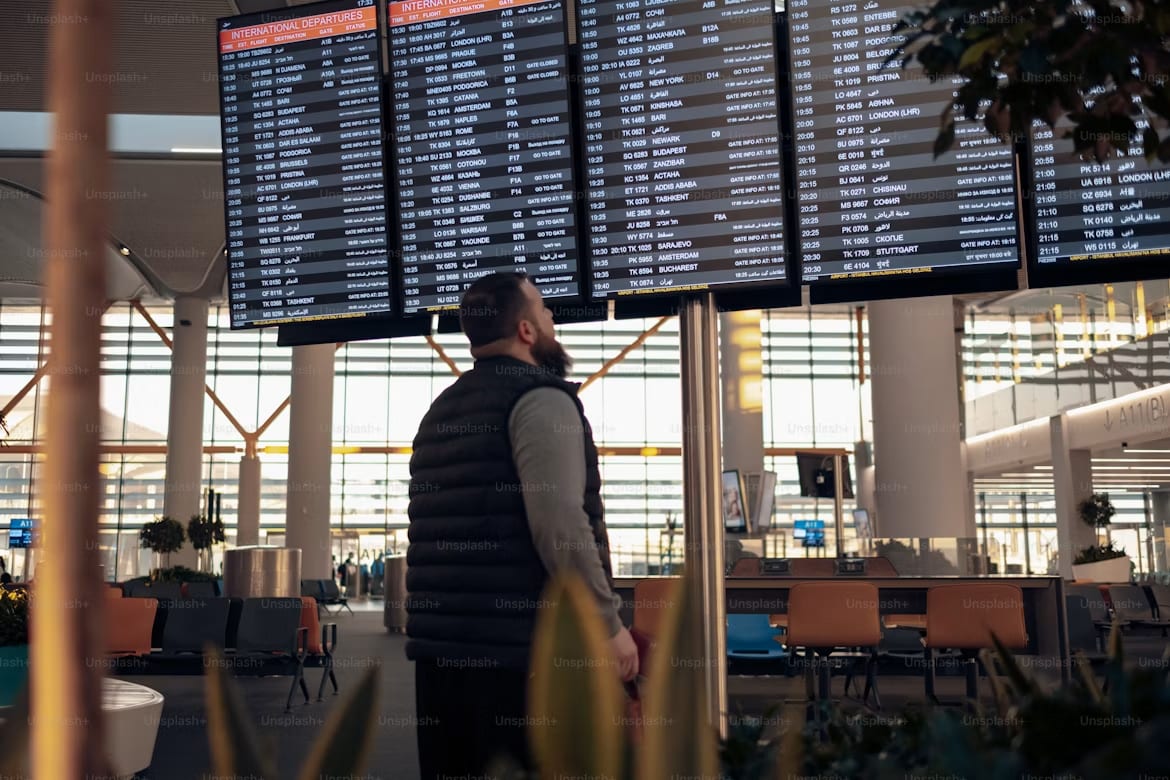
To explore this scenario, imagine you are in charge of public announcements at a large, bustling train station and want to broadcast train departure alerts directly to the devices of interested passengers using Auracast technology.
To deploy a public announcement system with Auracast in a railway terminal, the deployment process can be executed across five practical operational steps:
Step 1: Setting Up the Audio Transmitter Infrastructure
Instead of relying on a standard smartphone, connect the station's paging system and control room microphone directly to an industrial-grade Auracast transmitter.
These commercial transmitters feature dedicated audio line inputs, connections to control room mixers, and high-gain signal antennas for extended coverage.
The transmitter takes the analog feed from the live announcer or automated train schedule system and encodes it into digital LC3 audio packets in real time.
Step 2: Configuring and Naming Broadcast Channels
Using the transmitter's management dashboard, set up one or multiple public broadcast channels.
For example, create a primary channel named "Station Main Announcements."
To avoid information clutter, set up dedicated channels for individual platforms or multiple languages, such as "Platform 1 Announcements" or "English Announcements."
Set these streams to "Open" without password protection so passengers can tune in instantly without friction.
Step 3: Generating and Displaying QR Codes for Passengers
The Auracast management console generates unique metadata and QR codes for each active broadcast stream.
Print and place these QR codes across station information boards, passenger tickets, waiting area pillars, and platform entry gates with brief instructions.
Step 4: How Passengers Tune Into the Broadcast
Passengers do not need to install specialized apps to receive announcements through their earbuds, headphones, or hearing aids.
A passenger points their phone camera at the platform QR code, taps the prompt on screen, and their earbuds lock directly onto the station announcement stream.
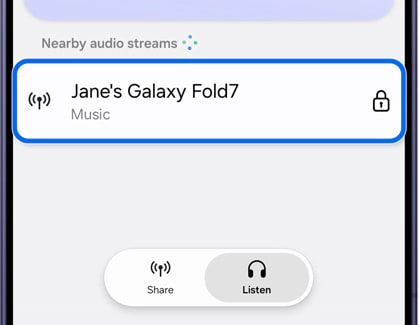
Passengers wearing compatible hearing aids or using the Auracast search menu in their phone's Bluetooth settings can see the station broadcast name in their nearby audio list and join with a single tap.
Step 5: Broadcasting Live Announcements to Thousands of Commuters
The station operator speaks into the microphone or the automated system announces departure schedules and train platform assignments.
The audio stream broadcasts instantaneously with ultra-low latency and millisecond synchronization to thousands of passengers across the station terminal.
Even while walking through loud, crowded areas, passengers hear clear, high-fidelity announcements streamed directly into their ears without background noise.
Can Auracast Be Used for File Transfers?
Auracast is designed exclusively for simultaneous audio streaming and cannot be used under any circumstances to transfer files (such as photos, videos, documents, or MP3 music files).
Here are the primary technical and practical reasons for this:
Isochronous Stream Architecture: Auracast is engineered for time-sensitive audio streaming that must broadcast over the air without interruption and with ultra-low latency. This protocol prioritizes continuous, real-time playback over guaranteed bit-by-bit data delivery.
Lack of Two-Way Handshake and Packet Acknowledgment (ACK/NACK): In standard file transfers, the receiving device must confirm to the sender that every data packet arrived intact to prevent file corruption. Auracast is strictly a one-way broadcast, meaning the transmitter receives no feedback or confirmation from receiving devices.
Dedicated LE Audio Layer: The Auracast architecture is built strictly around the LC3 audio codec pipeline and lacks higher-layer file exchange profiles (such as the legacy Bluetooth Object Push Profile / OPP).
For sharing files across multiple devices, systems will continue to rely on point-to-point Classic Bluetooth, Wi-Fi Direct, or tools like Quick Share and AirDrop.
What Are the Security Considerations, Potential Risks, and Precautions for Auracast?
Because of its connectionless broadcast architecture, Auracast is structurally far safer from network intrusion than Classic Bluetooth. Since receiving devices never establish a two-way connection with the transmitter, there is no pathway for unauthorized remote access, malware injection, or file directory exposure. Even so, using this broadcast standard introduces specific privacy, environmental, and audio-related security challenges.
Potential Risks and Security Threats:
Eavesdropping on Private Audio Streams:
If you broadcast audio in a home, office, or confidential meeting room without encryption, anyone with a compatible smartphone or pair of earbuds within radio range (up to dozens of meters) can listen to your audio, live conversations, or video feeds.
Channel Spoofing and Fake Broadcasts:
In crowded venues such as airports or convention centers, an attacker could set up a rogue transmitter using an identical or misleading network name to broadcast fake alerts, deceptive instructions, or abrasive audio.
Transmitter Tracking and Privacy Risks:
When active, an Auracast transmitter continuously broadcasts metadata packets into the surrounding area. If MAC address randomization is improperly implemented, nearby listening nodes could potentially log and monitor the physical presence or movement of the transmitter device.
Audio Bombing and Sudden High-Volume Spikes:
Tuning into an unverified or rogue broadcast stream could expose the listener to sudden bursts of deafening volume or high-frequency sounds, posing risks to hearing health.
QR Code Tampering:
In public spaces, bad actors could place malicious stickers over legitimate Auracast QR codes, redirecting users to phishing sites or credential harvesting forms instead of joining the official audio broadcast.
Security Best Practices to Follow
As a Listener (Receiver):
Verify the Broadcast Source Before Connecting: Avoid joining unknown audio streams or broadcasts without a clear, verified source.
Protect Against Sudden Volume Spikes: Before tuning into an unfamiliar public broadcast, turn your headphone or earbud volume down to a low or moderate level.
Scan QR Codes Safely: When scanning printed codes in public spaces, make sure the sticker or display has not been tampered with, and ensure the prompt opens a native Bluetooth audio connection rather than an external, suspicious web browser URL.
As a Broadcaster (Transmitter):
Use Encryption and a Broadcast Code: When streaming confidential meetings, personal movies, or private audio inside your home or car, always enable password protection (using standard AES-128 broadcast encryption) so only intended listeners can tune in.
Disable Broadcasting When Finished: Stop the broadcast mode on your phone or laptop as soon as you finish listening to prevent your device from sending unnecessary radio signals into the environment.
Use Generic Channel Names: Avoid using your full name, sensitive identifiers, or exact device models when naming your broadcast channel to protect your personal privacy.
What Is the Future of This Technology, and Could File Transfer Support Be Added Later?
The future of Auracast is heading toward becoming the global standard for modern audio infrastructure. Just as Wi-Fi made free public internet an everyday expectation in airports, hotels, convention centers, and hospitals, Auracast will soon make clear, multilingual ambient audio a default urban utility. As public television screens, sports stadiums, movie theaters, and museum tour systems integrate built-in Auracast transmitters, the demand for costly proprietary radio gear or disruptive public loudspeakers will steadily disappear, delivering equal acoustic access to casual listeners and individuals using hearing aids.
Regarding whether file transfers could be added in the future: the underlying Auracast protocol is engineered specifically for isochronous audio streams, prioritizing strict real-time delivery without packet acknowledgments (ACK). Because of this design choice, it will not turn into a direct tool for moving files, since reliable file transfers require guaranteed bit-by-bit accuracy, packet retransmissions, and robust handshakes. However, upcoming Bluetooth standards will leverage similar broadcast architectures for tasks like mass IoT over-the-air firmware updates (IoT Broadcast OTA) or lightweight text data broadcasts, while large consumer file transfers will remain on high-bandwidth Wi-Fi protocols and dedicated point-to-point connections.
Conclusion and Final Thoughts
Auracast marks a major milestone in wireless technology by finally dismantling the decades-old restriction of one-to-one Bluetooth pairing. More than just a routine hardware update, it introduces an entirely fresh paradigm for audio sharing, making clear sound truly accessible in loud public spaces while bridging the divide between consumer earbuds and medical hearing devices.
Ultimately, the core strength of Auracast is its frictionless accessibility. Without tedious pairing steps or device handshakes, anyone can tune into an audio stream simply by picking a broadcast name or scanning a QR code. As hardware adoption continues to grow, Auracast will not only upgrade how we share music and movies in daily life, but also establish a permanent, inclusive foundation for sound distribution across modern public environments.