FUNKY MAP HELP CENTER
Welcome to the Help Center. Whether you are planting your first sound or trying to understand how voting works, this guide will provide the answers you need to navigate our global soundscape.
GETTING STARTED AND ACCOUNT ACCESS
To fully interact with the map, you need to log in. We use secure external authentication so you do not have to memorize a new password. You can sign in instantly using your existing Google or Twitch account. Once logged in, you can plant sounds, vote on existing spots, and view your user profile. Guests can listen to the map but cannot upload or interact with the spots.
HOW TO PLANT AUDIO ON THE MAP
Planting a sound is simple. First, ensure you are logged in. Navigate to the Map page and tap anywhere on the globe where you want your sound to live. A prompt will appear allowing you to upload your audio file or choose a preset. You must provide a short description of the sound. The maximum file size allowed is 20 Megabytes, and the file must be a standard audio format. Please remember that you must have the rights to upload this audio.
LISTENING AND VOTING
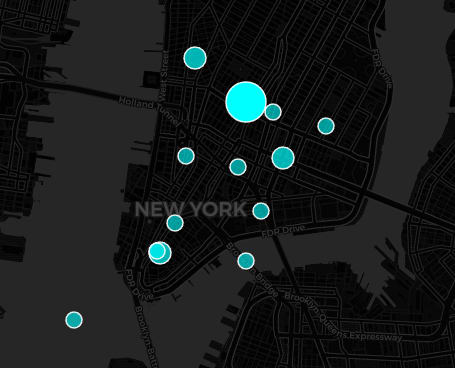
As you pan across the map, you will see circular hotspots. These represent planted audio. Click or tap on any circle to listen to the sound recorded at that location. If you enjoy a sound, you can upvote it. Upvoting a sound increases its popularity and actually makes its circle grow larger on the map. This helps the best and most authentic sounds stand out to other explorers.
REPORTING INAPPROPRIATE CONTENT
We rely on our community to keep the map clean and authentic. If you find a sound that is offensive, spam, or violates copyright, please report it. Click on the report button associated with the sound and select the reason for your report, such as Spam, Hate Speech, or Copyright. You can also leave a brief description of the issue. Our moderation team will review the spot and remove it if it violates our guidelines.
TROUBLESHOOTING COMMON ISSUES
If you are experiencing issues with the map loading, try clearing your browser cache and cookies, or ensure you have accepted the required functional cookies on our initial banner. If an audio upload fails, please check that your file size is strictly under the 20 Megabyte limit and that you have a stable internet connection.
STILL NEED ASSISTANCE
If your issue is not resolved by this guide, we are here to help. You can reach out to our administration team by visiting the Impressum or Contact page for further assistance. Please include a detailed description of the problem so we can resolve it as quickly as possible.